Virtual Reality Tours of Angkor Wat and
Angkor Thom
 in 2016 Dale began
experimenting with 360-degree cameras that shoot spherical
photos. Next
in 2016 Dale began
experimenting with 360-degree cameras that shoot spherical
photos. Next came learning how to link the
panoramas and adding photos, maps, and videos. The result was
a 360-degree tour that added a whole new dimension to the idea
of a virtual tour; these were designed for desktops, laptops,
tablets and smartphones. The next step was to make the tours
more fully immersive, using VR headsets with smartphones.
After experimenting with standalone apps, we have settled on
VR tours hosted on Seekbeak.com, which allows tour
creations to be adapted to virtual reality headsets like those
shown to the right. The tours of both Angkor Wat and Angkor
Thom now feature a VR option which may be accessed via the QR
code below each tour.
came learning how to link the
panoramas and adding photos, maps, and videos. The result was
a 360-degree tour that added a whole new dimension to the idea
of a virtual tour; these were designed for desktops, laptops,
tablets and smartphones. The next step was to make the tours
more fully immersive, using VR headsets with smartphones.
After experimenting with standalone apps, we have settled on
VR tours hosted on Seekbeak.com, which allows tour
creations to be adapted to virtual reality headsets like those
shown to the right. The tours of both Angkor Wat and Angkor
Thom now feature a VR option which may be accessed via the QR
code below each tour.
VR Angkor Wat:
This tour takes you from the
entrance to Angkor Wat through the grounds, the bas relief galleries, and
the upper three levels of the temple. It offers more details,
including photographs, videos and maps, as well as providing a
360 degree view. It examines the history, religion and
architecture of Angkor Wat, and it is about as close to being
there as a web-based tour can be.
Virtual Tour
of Angkor Wat Temple
Virtual Reality Tour for VR Headsets:
 There is also a
version of this tour that works in VR headsets, such as
Google Cardboard, and it works with both iPhones as well as
on Android smartphones. It can be accessed by scanning the
QR code on the left. If you are viewing this on a mobile
phone, you may access the VR tour by following this link.
There is also a
version of this tour that works in VR headsets, such as
Google Cardboard, and it works with both iPhones as well as
on Android smartphones. It can be accessed by scanning the
QR code on the left. If you are viewing this on a mobile
phone, you may access the VR tour by following this link.
For iOS
devices: scan QR code
with device camera app, tap on prompt to open Safari, select
"allow device motion" and on the next prompt "allow access
to motion orientation." Turn device to landscape mode and a
split screen will appear. When the screen turns white, swipe
up for fullscreen and place device in headset. Here is
a video of how to do
this--it is simpler than it sounds! [Video opens in a
separate window-close window to return to page]
For
Android devices: use the
phone's camera to scan the QR code, and then select the tour
you want to visit. Wait for the tour to load. Tour will
appear in a split screen, and tap on the "X" and the bottom
menu to go fullscreen. Turn the phone to portrait mode,
place in headset and enjoy the tour. Here is
a video of how to do
this--it is simpler than it sounds! [Video opens in a
separate window-close window to return to page]
VR Angkor
Thom:
This tour takes virtual
visitors through some of the most famous temples in Siem
Reap, as well as some that visitors rarely see. The tour
begins at the Southern Gate and proceeds in a clockwise
fashion around the walled city of Angkor Thom.
There are embedded photographs,
videos and maps that offer a more detailed view of the site.
Here is a "Teaser" Trailer of the Tour
Virtual
Tour of Angkor Thom Temples
Virtual
Reality
Tour
for VR Headsets:
 There is also a version
of this tour that works in VR headsets, such as Google
Cardboard, and it works with both iPhones as well as on
Android smartphones. It can be accessed by scanning the QR
code on the left. If you are viewing this on a mobile phone,
you may access the VR tour by following this link.
There is also a version
of this tour that works in VR headsets, such as Google
Cardboard, and it works with both iPhones as well as on
Android smartphones. It can be accessed by scanning the QR
code on the left. If you are viewing this on a mobile phone,
you may access the VR tour by following this link.
For iOS
devices: scan QR code
with device camera app, tap on prompt to open Safari,
select "allow device motion" and on the next prompt "allow
access to motion orientation." Turn device to landscape
mode and a split screen will appear. When the screen turns
white, swipe up for fullscreen and place device in
headset. Here
is a video of how to do
this--it is simpler than it sounds! [Video opens in a
separate window-close window to return to page]
For
Android devices: use
the phone's camera to scan the QR code, and then select
the tour you want to visit. Wait for the tour to load.
Tour will appear in a split screen, and tap on the "X" and
the bottom menu to go fullscreen. Turn the phone to
portrait mode, place in headset and enjoy the tour. Here
is a video of how to do
this--it is simpler than it sounds! [Video opens in a
separate window-close window to return to page]
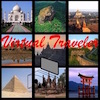 If you enjoyed
these tours (and especially if you have a VR headset such as
Google Cardboard), please consider visiting our companion VR
site, The Virtual Traveler, which features desktop and VR
headset tours from around the world.
If you enjoyed
these tours (and especially if you have a VR headset such as
Google Cardboard), please consider visiting our companion VR
site, The Virtual Traveler, which features desktop and VR
headset tours from around the world.
